Asp.Net MVC
- The MVC separates the user interface (UI) of an application into three main aspects:
- MVC stands for Model View Controller and it offers a way to separate an application into those three main components.
- The Model: A set of classes that describes the data you’re working with as well as the business rules for how the data can be changed and manipulated. The classes that deal with storing, manipulating and retrieving the data.
- The View: Defines how the application’s UI will be displayed. Views, which are the UI components of our application and could be as sample as an HTML page.
- The Controller: A set of classes that handles communication from the user, overall application flow, and application-specific logic. controllers, which are responsible for handling user input and then presenting the appropriate view coupled with the appropriate model.
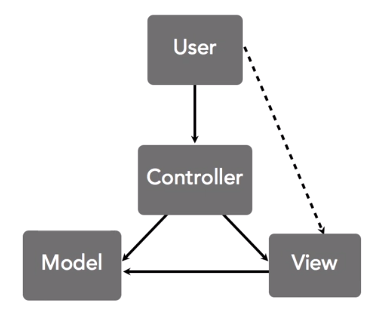
The user interacts with the application primarily by using the browser to make HTTP requests. And those requests are handled by the controller. The controller passes messages to the model about what data to create, load, update or delete. Then the controller arranges for a specific view to be presented to the user. And make sure the view has access to the data that it needs, which is exposed by the model. The view can refer to properties of the model and its layout, but it shouldn't contain any data processing logic of its own. It's important to understand that the user sees the view but the view doesn't actually handle the user's requests. In fact, it's not even involved at all when we're just typing URL into the address bar, for example. So the view is really just something that helps the user invoke the methods of the controller. In the next video, we'll see what all this looks like in an ASP.net MVC application and explore the folder file structure that will help promote the principles of this pattern.
How about this - off the top of my head, hopefully it works for you. MVC can be metaphorically related to a TV. You have various channels, with different information on them supplied by your cable provider (the model). The TV screen displays these channels to you (the view). You pressing the buttons on the remote controls affects what you see and how you see it (the controller). I was watching TV, so I got some inspiration from there!
| Type | Helper Method | Description |
|---|---|---|
| ViewResult | View() | Renders a view as a Web page. |
| PartialViewResult | PartialView() | Renders a partial view, which defines a section of a view that can be rendered inside another view. |
| RedirectResult | Redirect() | Redirects to another action method by using its URL. |
| RedirectToRouteResult | RedirectToAction() | Redirects to another action method. |
| ContentResult | Content() | Returns a user-defined content type. |
| JsonResult | Json() | Returns a serialized JSON object. |
| HttpNotFoundResult | HttpNotFound() | |
| EmptyResult | (None) | Represents a return value that is used if the action method must return a null result (void). |
| FileResult | File() | Returns binary output to write to the response. |